Start with the web. Derive anything you imagine.
Pick one Topic and native content is waiting for every keyword in it. No searching, no tabs, no setup. From there, AI turns it into whatever you can think of. Here is what has been built so far.
Native From the Internet, unaltered
Six content types, plus Power Search, each brought in from its source and shown exactly as published.

Dozens of pictures per keyword, found on the web and saved as published, ready to browse the moment you open it.

A full run of related YouTube videos, already found and lined up for you to watch.

Stacks of in-depth reads from real sources, kept as the original PDFs you can open anytime.

Coverage of your Topic from a range of outlets, each shown the way the outlet published it, under its own logo. Each outlet carries derived popularity stars and dynamic links.

Related products from real stores, right beside what you're reading. Each store carries derived popularity stars and dynamic links.

How search interest in the keyword has risen and fallen over time, straight from Google Trends.
A pre-seeded search grid. An AI model comes up with long-tail variations of the keyword, generating them on the spot if none exist yet. Each variation is lined up against every major search engine: Google, YouTube, Bing, Yahoo, DuckDuckGo, Pinterest and Yandex. One click runs "Topic + variation + keyword" there. The variations are derived; the results are the engines' own, unaltered.
Derived Generated from the keyword and native files
First-level derivations, each made directly from the keyword or from native files. They are examples of what is possible, not a fixed menu.

A plain-language explanation written by an AI model, using both the Topic and the keyword so it picks the right meaning.

A one-of-a-kind image generated for the keyword by Stable Diffusion, running on our own server.
For each of the keyword's PDF articles, an AI model writes a summary and a glossary of its key terms, so you get the gist before opening one.

The camera and metadata details read out of each image file and laid out for the whole collection.
Derived · 2nd level Generated from derived content
Second-level derivations, each built from content that was itself derived, often combined with native files. Derived content can be derived again, as many levels deep as the idea needs.

The definition converted to audio by the Kokoro text-to-speech engine. Press play and listen instead of reading.
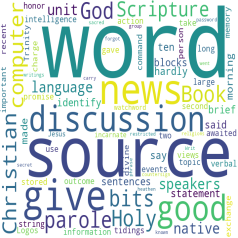
The language of the definition drawn as a cloud, so you see what matters at a glance.

Short, surprising facts an AI model writes from a content group. Each one says which group it came from.

A self-running show across the whole Topic, navigated keyword by keyword. Images and AI pop art make the slides, videos play as frames, and the narration MP3 voices it all.
The types on this page are what's been built so far, not the limit. A new derived type is one more task in the same pipeline: point an AI model at the keyword, its native files or other derived content, and say what to make. Background workers build it for every keyword in every Topic, it gets its own button in the Content Type grid, and it publishes with the rest of the site. Every derived type above runs on that same infrastructure.
Inside the slideshow
The slideshow combines content types. The keyword's images and its AI pop art become slides, and its videos play as frames within the show. Swap the sources in and out, and step through the whole Topic keyword by keyword. The narration plays over the top and can be muted. It's derived from the definition, which was itself derived by an AI model.
Images Native
+
Pop Art Derived
Video Native
each video plays as a frame of the show
Narration MP3 2nd level
read from the AI definition · on or off
 Keyword by keyword
through every keyword in the Topic
Keyword by keyword
through every keyword in the Topic
What shapes every Topic
The lists that drive each Topic and its searches, plus the ratings on its sites. Two of the lists are inputs: the keyword list feeds every task, and the filter list supplies the checkbox options in Filter Words Search.
The input to everything: each Topic's keywords, fed in one at a time. Type them (Method A) or upload a file (Method B), and the list comes from you, like native content. Or let an AI model generate it from the Topic (Method C), and the list is derived.
Filter Words Search
Search a whole content group at once, using words that are already in it. Each group's corpus (every PDF's text, every image's EXIF data, every video's transcript) is searchable by word, by long-tail phrase or by part of speech. Switch words on, press Scan, and every file in the group that contains them is listed with its match count.
All PDF text
All EXIF data
All transcripts